btn = uibutton()
btn = uibutton(style)
btn = uibutton(parent)
btn = uibutton(parent, style)
btn = uibutton(..., propertyName, propertyValue)
| Parameter | Description |
|---|---|
| parent | figure created with uifigure, or figure graphics object. |
| style | button style: 'push' (default) or 'state'. |
| propertyName | property name: a scalar string or row vector character. |
| propertyValue | property value: a value compatible with property name. |
| Parameter | Description |
|---|---|
| btn | a Button or StateButton object. |
btn = uibutton creates a push button in a new figure and returns the Button object. Nelson calls the uifigure function to create the figure.
btn = uibutton(style) creates a button of the specified style: 'push' creates a push button (Button object, ButtonPushedFcn callback), 'state' creates a state button (StateButton object, with a boolean Value and a ValueChangedFcn callback).
btn = uibutton(parent) creates the button in the specified parent container.
btn = uibutton(..., propertyName, propertyValue) specifies properties as one or more name-value arguments: Text, Icon, IconAlignment, HorizontalAlignment, VerticalAlignment, WordWrap, FontName, FontSize, FontWeight, FontAngle, FontColor, BackgroundColor, Enable, Visible, Tooltip, Position, ButtonPushedFcn (push), Value and ValueChangedFcn (state), ...
f = uifigure('Visible', 'off', 'Name', 'Buttons', 'Position', [100 100 420 260]);
btn = uibutton(f, 'Text', 'Run', 'Position', [85 130 110 30]);
sb = uibutton(f, 'state', 'Text', 'Enabled', 'Value', true, 'Position', [225 130 110 30]);
drawnow();
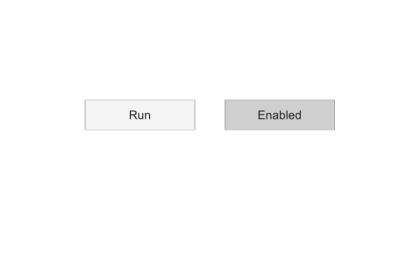
f = uifigure();
btn = uibutton(f, 'Text', 'Click me', 'Position', [100 100 100 22], 'ButtonPushedFcn', @(src, event) disp('pushed'))
f = uifigure();
sb = uibutton(f, 'state', 'Text', 'Enable option', 'Value', true)
| Version | Description |
|---|---|
| 2.0.0 | initial version |