lbl = uilabel()
lbl = uilabel(parent)
lbl = uilabel(..., propertyName, propertyValue)
| Parameter | Description |
|---|---|
| parent | figure created with uifigure, or figure graphics object. |
| propertyName | property name: a scalar string or row vector character. |
| propertyValue | property value: a value compatible with property name. |
| Parameter | Description |
|---|---|
| lbl | a Label object. |
lbl = uilabel creates a label in a new figure and returns the Label object. Nelson calls the uifigure function to create the figure.
lbl = uilabel(parent) creates the label in the specified parent container.
lbl = uilabel(..., propertyName, propertyValue) specifies label properties as one or more name-value arguments: Text, Interpreter, HorizontalAlignment, VerticalAlignment, WordWrap, FontName, FontSize, FontWeight, FontAngle, FontColor, BackgroundColor, Enable, Visible, Tooltip, Position, ...
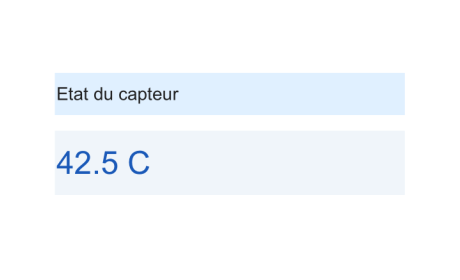
f = uifigure('Visible', 'off', 'Name', 'Labels', 'Position', [100 100 460 280]);
titleLabel = uilabel(f, 'Text', 'Sensor status', 'FontSize', 18, 'FontWeight', 'bold', 'BackgroundColor', [0.88 0.94 1.00], 'Position', [55 165 350 42]);
valueLabel = uilabel(f, 'Text', '42.5 C', 'FontSize', 32, 'FontWeight', 'bold', 'FontColor', [0.10 0.35 0.72], 'HorizontalAlignment', 'center', 'BackgroundColor', [0.94 0.96 0.98], 'Position', [55 85 350 64]);
drawnow();
f = uifigure();
lbl = uilabel(f, 'Text', 'Result:', 'Position', [100 100 100 22], 'FontWeight', 'bold')
| Version | Description |
|---|---|
| 2.0.0 | initial version |