uitable
Create table UI component (App Designer style).
📝Syntax
h = uitable()
h = uitable(parent)
h = uitable(..., propertyName, propertyValue)
📥Input Arguments
Parameter Description
parent parent object.
propertyName, propertyValue name-value pairs.
📤Output Arguments
Parameter Description
h UI object.
📄Description

t = uitable creates a table component. Data accepts numeric, logical, or cell arrays. Properties: ColumnName ('numbered' or cell), RowName, ColumnWidth, ColumnEditable, ColumnSortable, ColumnFormat, RowStriping, Selection/SelectionType/Multiselect, DisplayData (read-only). Callbacks: CellEditCallback (event: Indices, EditData, NewData), SelectionChangedFcn.

💡Examples
Captured UI component for the help image.
f = uifigure('Visible', 'off', 'Name', 'Table', 'Position', [100 100 420 260]);
t = uitable(f, 'Data', magic(4), 'ColumnName', {'A', 'B', 'C', 'D'}, 'Position', [55 40 310 180]);
drawnow();
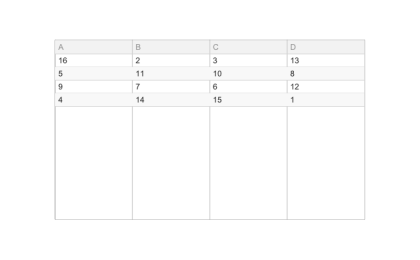
Example illustration
uitable
f = uifigure();
t = uitable(f, 'Data', magic(4), 'ColumnName', {'A', 'B', 'C', 'D'}, 'ColumnEditable', true(1, 4));
🔗See Also
uifigure
🕔Version History
Version Description
2.0.0 initial version
Edit this page on GitHub