uipanel
Create panel container.
📝Syntax
h = uipanel()
h = uipanel(parent)
h = uipanel(..., propertyName, propertyValue)
📥Input Arguments
Parameter Description
parent parent container (uifigure, figure, uipanel, uitab, uibuttongroup, uigridlayout).
propertyName, propertyValue name-value pairs.
📤Output Arguments
Parameter Description
h container object.
📄Description

p = uipanel creates a panel container in a new figure (uifigure). A panel groups UI components; children are positioned relative to the panel. Main properties: Title, TitlePosition ('lefttop', 'centertop', 'righttop'), BackgroundColor, ForegroundColor, BorderType ('line', 'none'), BorderWidth, BorderColor, Position, Scrollable, AutoResizeChildren, SizeChangedFcn.

💡Examples
Captured UI component for the help image.
f = uifigure('Visible', 'off', 'Name', 'Panel', 'Position', [100 100 420 260]);
p = uipanel(f, 'Title', 'Settings', 'Position', [80 45 260 170]);
uicheckbox(p, 'Text', 'Enabled', 'Value', true, 'Position', [25 95 120 24]);
uibutton(p, 'Text', 'Apply', 'Position', [25 45 100 28]);
drawnow();
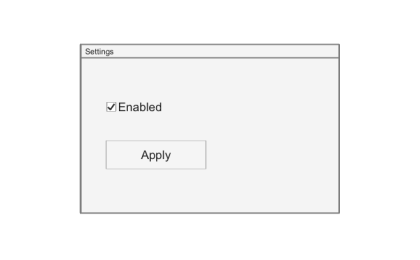
Example illustration
uipanel
f = uifigure();
p = uipanel(f, 'Title', 'Options', 'Position', [20 20 260 221]);
b = uibutton(p, 'Text', 'OK', 'Position', [20 20 100 22]);
🔗See Also
uifigure
🕔Version History
Version Description
2.0.0 initial version
Edit this page on GitHub