h = uigridlayout()
h = uigridlayout(parent)
h = uigridlayout(..., propertyName, propertyValue)
| Parameter | Description |
|---|---|
| parent | parent container (uifigure, figure, uipanel, uitab, uibuttongroup, uigridlayout). |
| propertyName, propertyValue | name-value pairs. |
| Parameter | Description |
|---|---|
| h | container object. |
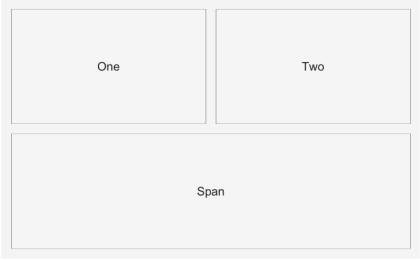
g = uigridlayout creates a grid layout manager that positions its children in a configurable grid. g = uigridlayout(parent, [r c]) creates an r-by-c grid. RowHeight and ColumnWidth accept fixed pixel sizes, weighted sizes ('1x', '2x', ...), and 'fit'. Children are placed via their Layout.Row / Layout.Column options (scalar or [start end] span); components added without explicit placement fill the grid left to right, top to bottom. Other properties: RowSpacing, ColumnSpacing, Padding, BackgroundColor, Scrollable.
f = uifigure('Visible', 'off', 'Name', 'Grid layout', 'Position', [100 100 420 260]);
g = uigridlayout(f, [2 2]);
b1 = uibutton(g, 'Text', 'One');
b2 = uibutton(g, 'Text', 'Two');
b3 = uibutton(g, 'Text', 'Span');
b3.Layout.Row = 2;
b3.Layout.Column = [1 2];
drawnow();
f = uifigure();
g = uigridlayout(f, [2 2]);
b1 = uibutton(g, 'Text', 'One');
b2 = uibutton(g, 'Text', 'Two');
b3 = uibutton(g, 'Text', 'Span');
b3.Layout.Column = [1 2];
g.RowHeight = {22, '1x'};
| Version | Description |
|---|---|
| 2.0.0 | initial version |