Examples
Display an isosurface from volume data.
[x, y, z] = meshgrid(-2:0.25:2, -2:0.25:2, -2:0.25:2);
v = x.^2 + y.^2 + z.^2;
isosurface(x, y, z, v, 1);
axis equal;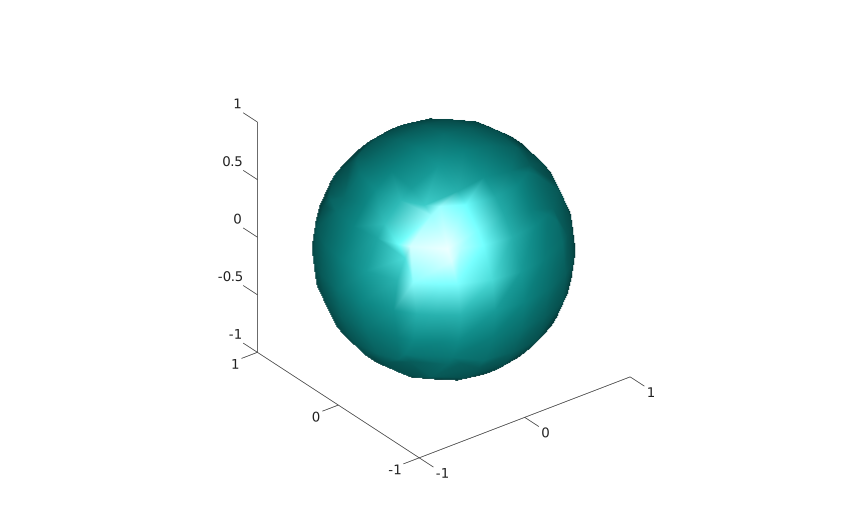
isosurface(X, Y, Z, V, isovalue)
s = isosurface(X, Y, Z, V, isovalue)
s = isosurface(X, Y, Z, V)
s = isosurface(V, isovalue)
s = isosurface(V)
s = isosurface(..., colors)
s = isosurface(..., 'noshare')
s = isosurface(..., 'verbose')
[faces, vertices] = isosurface(...)
[faces, vertices, colors] = isosurface(...)
| Parameter | Description |
|---|---|
| X, Y, Z | Grid vectors or 3-D grid arrays matching V. |
| V | Real numeric 3-D volume data. |
| isovalue | Scalar level used to extract the surface. When omitted, Nelson chooses a level from the finite data values. |
| colors | Real numeric 3-D color data with the same size as V. |
| Parameter | Description |
|---|---|
| s | Structure with faces and vertices fields, and facevertexcdata when color data is supplied. |
| faces, vertices, colors | Triangle connectivity, vertex coordinates, and interpolated color values. |
isosurface extracts a triangular surface where the volume data reaches a requested scalar value. With no output arguments, the surface is displayed as a patch object in the current axes.
The 'noshare' option skips shared-vertex reduction. The 'verbose' option is accepted for compatibility.
[x, y, z] = meshgrid(-2:0.25:2, -2:0.25:2, -2:0.25:2);
v = x.^2 + y.^2 + z.^2;
isosurface(x, y, z, v, 1);
axis equal;