Examples
f = figure();
for i = 1:4
subplot(2, 2, i)
hist(randn(1000, 1), 50)
end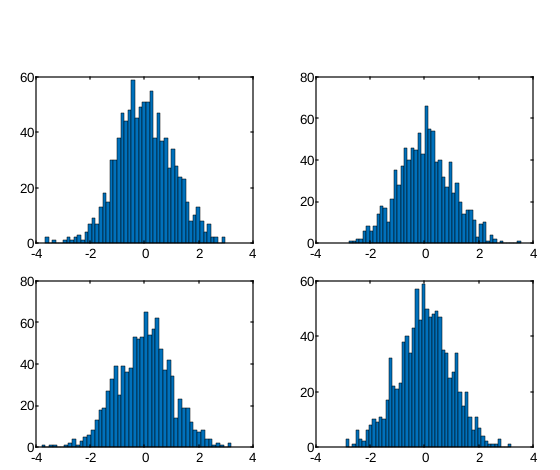
hist(x)
hist(x, nbins)
hist(ax, ...)
counts = hist(...)
[counts, centers] = hist(...)
| Parameter | Description |
|---|---|
| x | vector or matrix |
| nbins | vector. |
| ax | Axes object. |
| Parameter | Description |
|---|---|
| counts | Counts of the number of elements in each bin: row vector. |
| centers | Bin centers: vector. |
A histogram is a graphical representation that illustrates the distribution of data values.
When you use thehist function, it organizes the elements in the vectorY into 10 equally spaced containers and provides the count of elements in each container as a row vector.
hist(Y, x) with a vectorx, the function will return the distribution of values inY among bins determined by the length ofx, with centers specified by the values in x.
For instance, if x is a 5-element vector,hist will categorize the elements ofY into five bins, each centered on the x-axis at the values specified inx.
When you usehist(...) without specifying any output arguments, it generates a histogram plot. The bins are distributed along the x-axis between the minimum and maximum values found in the input vectorY.
f = figure();
for i = 1:4
  subplot(2, 2, i)
  hist(randn(1000, 1), 50)
end| Version | Description |
|---|---|
| 1.0.0 | initial version |