contour
Contour plot of matrix
📝Syntax
contour(Z)
contour(X, Y, Z)
contour(..., levels)
contour(..., LineSpec)
contour(ax, ...)
M = contour(...)
[M, h] = contour(...)
📥Input Arguments
Parameter Description
X x-coordinates: vector or matrix.
Y y-coordinates: vector or matrix.
Z z-coordinates: matrix.
levels Contour levels: scalar or vector.
LineSpec Line specification defining line style and color.
ax a scalar graphics object value: parent container specified as an axes.
📤Output Arguments
Parameter Description
M Contour matrix.
h a graphics object: contour type.
📄Description

contour(Z) generates a contour plot representing isolines of the matrix Z. Each isoline corresponds to a specific height value on the x-y plane.

Nelson automatically selects contour lines based on the values in Z. The column and row indices of Z serve as the x and y coordinates in the plane, respectively.

contour(X, Y, Z) allows the user to specify the x and y coordinates corresponding to the values in matrix Z. This enables more precise control over the positioning of the contour plot on the x-y plane.

The matrices X and Y provide the coordinates, while Z contains the height values for generating the contour plot.

Property Name-Value Pairs:

Property Description
LevelList The contour levels, specified as a vector of z values, determine the height levels at which contour lines are drawn. By default, when not explicitly provided, the contour function automatically selects these values to cover the range of values present in the ZData property. Default: empty matrix.
LevelListMode Selection mode for LevelList: 'manual' or 'auto' (default).
LevelStep Spacing between contour lines: scalar numeric value or 0 (default).
LevelStepMode Selection mode for LevelStep: 'manual' or 'auto' (default).
EdgeColor Color of contour lines: rgb color or 'flat' (default).
EdgeAlpha Contour line transparency specified as a scalar in the range [0, 1]. Default: 1.
LineStyle Line style: '--', ':', '-.' or '-' (default).
LineWidth Line width: positive numeric scalar. Default: 0.5.
ContourMatrix Contour matrix returned by contourc.
XData x values: vector or matrix or [] (default).
YData y values: vector or matrix or [] (default).
ZData z values: matrix or [] (default).
XDataMode Selection mode for XData: 'manual' or 'auto' (default).
YDataMode Selection mode for YData: 'manual' or 'auto' (default).
DisplayName Legend label: character vector, string scalar or ' '(default).
Visible State of visibility: on/off logical value, 'on' (default).
Parent Parent: Axes object or Group object.
Children Children graphics objects.
HandleVisibility Visibility of handle: 'on' or 'off'.
Type Object type: 'contour'.
Tag Object identifier: character vector, string scalar or ' ' (default).
UserData User data: array or [] (default).
CreateFcn Callback (function handle, string or cell) called when the object is created. Setting this property on an existing component has no effect.
DeleteFcn Callback (function handle, string or cell) called when the object is deleted.
BeingDeleted Flag indicating that the object is being deleted.
💡Examples
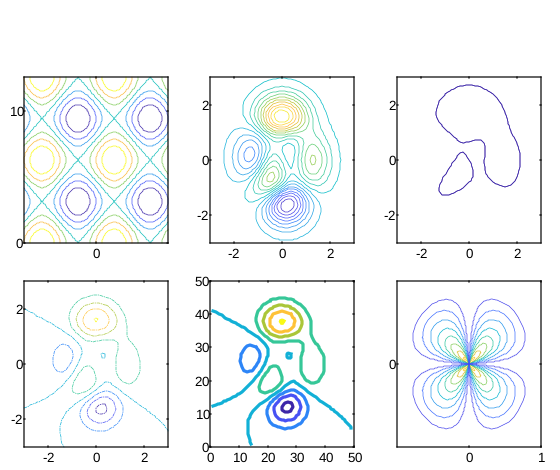
f = figure();
subplot(2, 3, 1)

x = linspace(-2 * pi, 2 * pi);
y = linspace(0, 4 * pi);

[X, Y] = meshgrid(x, y);

Z = sin(X) + cos(Y);

contour(X, Y, Z);

subplot(2, 3, 2)

[X, Y, Z] = peaks;

contour(X, Y, Z, 20)

subplot(2, 3, 3)

[X, Y, Z] = peaks;

v = [1, 1];

contour(X, Y, Z, v)

subplot(2, 3, 4)

[X, Y, Z] = peaks;

contour(X, Y, Z, '-.')

subplot(2, 3, 5)

Z = peaks;

[M, c] = contour(Z);

c.LineWidth = 3;

subplot(2, 3, 6)

[theta, r] = meshgrid(linspace(0, 2 * pi, 64), linspace(0, 1, 64));

[X, Y] = pol2cart(theta, r);

Z = sin(2 * theta) .* (1 - r);

contour(X, Y, abs(Z), 10);
Example illustration
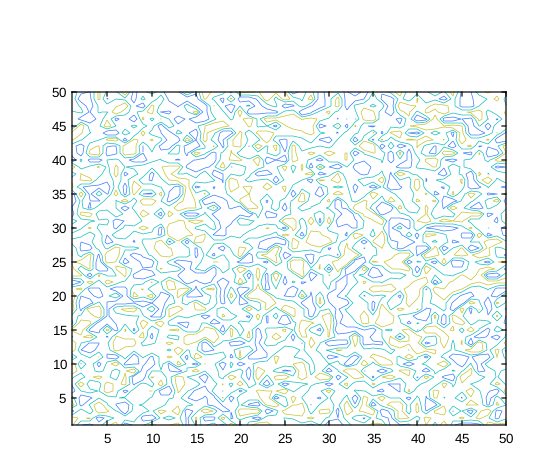
rng('default');
f = figure();
N = 50;
contour(1:N, 1:N, rand(N), 5)
Example illustration
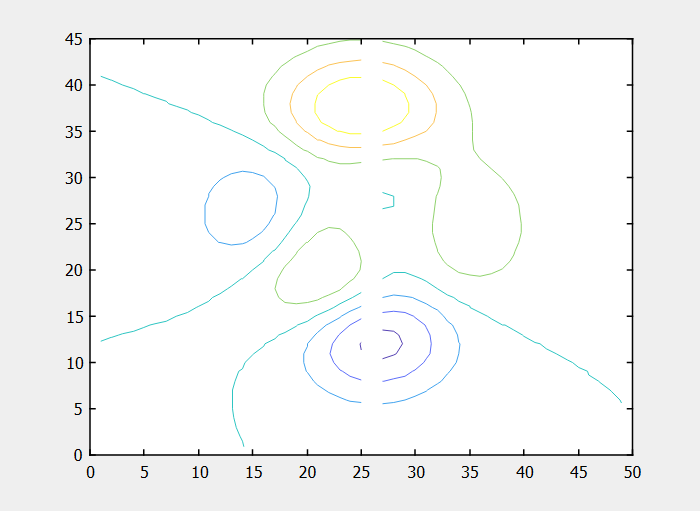
f = figure();
Z = peaks;
Z(:, 26) = NaN;
contour(Z)
Example illustration
Labeled contour lines.
[X, Y, Z] = peaks;

[C, h] = contour(X, Y, Z);

clabel(C, h);
🔗See Also
contourccontourfcontour3clabelsurfmesh
🕔Version History
Version Description
1.3.0 Initial version.
1.7.0 CreateFcn and DeleteFcn callbacks added.
1.8.0 BeingDeleted property added.
Edit this page on GitHub