wordcloud
Display words with sizes proportional to weights.
📝Syntax
wordcloud(words, sizes)
wordcloud(words)
wordcloud(tbl, wordvar, sizevar)
wordcloud(parent, ...)
h = wordcloud(...)
📄Description

wordcloud creates a word cloud chart whose font sizes are based on numeric weights or category counts and returns a wordcloud graphics object.

wordcloud(tbl, wordvar, sizevar) uses the table variable wordvar as word labels and sizevar as numeric weights.

The returned object stores the displayed words in WordData and their weights in SizeData.

The wordcloud properties page lists the supported object properties.

Supported properties are MaxDisplayWords, Color, HighlightColor, Shape, LayoutNum, SizePower, FontName, TitleFontName, Box, Title, OuterPosition, InnerPosition, Position, Units, and PositionConstraint.

💡Examples
Display weighted terms from a table.
terms = {'solver'; 'matrix'; 'plot'; 'graphics'; 'signal'; 'model'; 'tests'; 'data'; 'script'; 'analysis'};
counts = [42; 37; 31; 29; 22; 18; 16; 13; 11; 8];
T = table(terms, counts, 'VariableNames', {'Term', 'Count'});
wordcloud(T, 'Term', 'Count', 'MaxDisplayWords', 8, 'Shape', 'rectangle', 'Color', [0.066 0.443 0.745]);
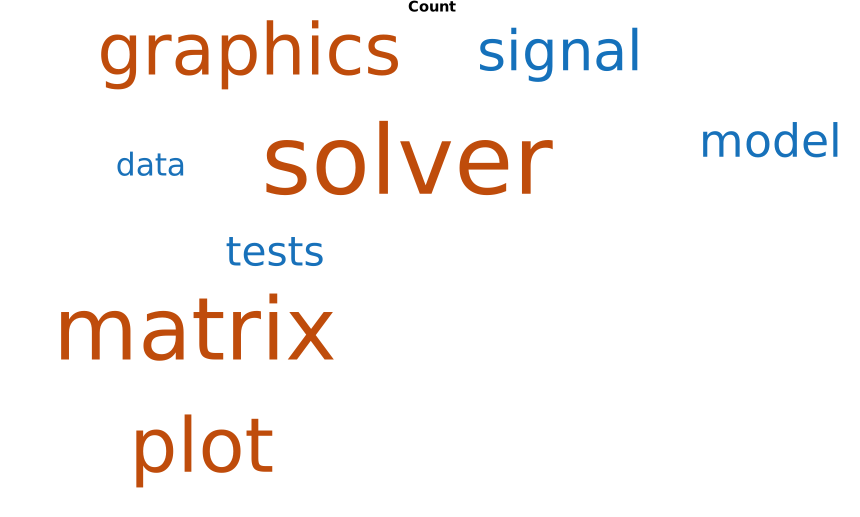
Example illustration
🔗See Also
textwordcloud properties
Edit this page on GitHub